
Games are now on Google +.


Believe me, it has never been so fine. The game will be easy to play with no difficulty. If you want to play games, it charges a very little fee. There are a list of games on GPlus to play. I have tried them my selves.There is cityville, Angry Birds and many more. All you got to do is have a Google Plus Id and just click the games teb. The rest will be lot's of fun.

Don't get upset if you don't have a google plus Id . Get, it here. For free.

Anyways, thanks for reading this post and keep coming : ) Also, enjoy the gaming on GPlus.

 Read More
Add your Comment
1 comments
Read More
Add your Comment
1 comments
Bookmark this post: | 


|
Must have chrome extensions for bloggers?


#1 : Google related. It is a must have as i have already told many bloggers on my site and also manually. It works in the way that you can see the related content links to the reading content. This helps you to explore more and know more.

#2 : Blog this, it is available on the webstore and is easy to use. It allows you to blog anything as quick as you get to think about it. It is a must have and is available on both blogger and wordpress.

#3 : Alexa Ranking: This extension allows you to see the rating and the rank of the site you are currently viewing. It allows you to read only the good content and also comment on it if you really like the content.
So, these were the extensions, we hope that you find no difficulty in finding these as they are easy to find. Thanks for reading and keep coming :)
Read More
Add your Comment
1 comments
Bookmark this post: |
|
Google related:extension for chrome(review+download)
Hello friends. I know that it is really hard to find the correct results or content for your relevance. But it has been made some easier with the Google Inc. Google always makes new and good updates to use up your information. And helps us out of all the problems.

It has again come up with the new Google related domain helper extension. Google related works in a very quite and sympathetic way. What it does it simply show extra tricks and related stuff for your website that you are viewing currently. You can always make a correct search or decision with it. already Google chrome is growing so fast and now this extension. We think that soon Chrome will outrank firefox. You can try this absolutely free and it is not even paid for. You can have it for free.

Think of it, don't pay for anything and still have the fun. The Google chrome extension can be added and removed by your choice. It appears in the lower part of the browser and shows the result only when you bring the mouse on it.
The Google chrome related can also be stopped. If you are viewing something and you don't want any interference. Then you can switch it off by clicking the close button at the upper right corner of the taskbar.
If you want to download it: follow this link.
Once again. Thanks for reading this post. I can assure you the comfort in Chrome related as i have tested it myself. Thanks for reading and keep coming :)
Read More
Add your Comment
1 comments
Bookmark this post: |
|
The Top Google Plus tips and tricks.

Hello Friends. We all are addicted to google plus as we were addicted to Facebook in the past. While some would like to stick to facebook. The others know how to keep moving. And if you are new to google plus then we can tech you some tricks that will surely make you a master to your Gplus friends.

So, we have these tricks as they are:
- Use these shortcuts according to your needs and save time.
Shift = scroll up
J = scroll down one post
K = scroll up one post
Q = jump to chat
Return = comment
Tab and return = end the particular friend.
You can also save time by directly hitting enter to comment while reading( this might save you some seconds).

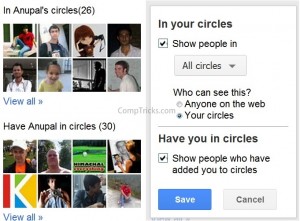
- Mentioning special people:
You can also mention people specifically to your post by typing his name and the post will easily show you the people associated to that name allowing you to select one and easily tell them that you are writing about him.
- Green means public, Blue means limited:
In the posting area, If PUBLIC is written in green, then it means that you're post would be read by any of your friend's. If the group name is written in blue, then it means that you can't show it to all. It would be available to people of that circle only.
- Adding Multimedia objects:

You can simply add any photos, videos, and links to your post by clicking the options that are given below the writing area of any post.
- Adding many persons at once.
Yes, you can add a lot of people to your circles and that also by only one click. For that you will have to click see all in the suggested friends in the sidebar. Then, in the next page. The persons would be shown. You have to simply click on options that must be showing select all or block everyone of these. Now, by selecting all, all the friends would be selected. Click and drag all to the desired circle. All of them would be surely added to your friend's list.
You can also block these persons in the same way.
We hope you will enjoy social networking with these tricks. Make you social life better but son;t forget to plus one this post. Thanks for reading and keep coming :)
Read More
Add your Comment
1 comments
Bookmark this post: |
|
Don't get banned by Search Engines! (Follow these SEO Tricks)

Hello, all the bloggers. You must be searching for blogging details and these are some really important on of them. The Blog takes a lot ot be good and it is your duty to keep it healthy. If you have been blogging since some time then you must have been hearing that Search Engines are the GOD of bloggers. If there is a quality blog than it is obvious that 60% of it's total pageviews must be coming from a dearch engine.
You need to be visible on the Search Engine to be even visible to the World. Yes, If you are De-indexed from Search Engines then there is no use of your site to be visible to everyone in the world. You always have to be visible in the Search Engines if you think to be blogging on a higher level. If you want to be the best you gotta' keep up with the best.
As we know that many times doing too much of thinking and experimenting on your blog. You may even sometimes get it banned by Search Engines. And, To reduce the possibility for that we are helping you out with these new tricks. Read them and use them :
- If there are too much of links on your blog. You must always show only the link. Don't show the same Anchor text for many links or your blog will show Search Engines this bad image that it have got repited text and on the same post of the same page.
- If you like interlinking, Then we suggest to only interlink the Pages to each other. Some mis-understanding leads the bloggers to think that every post have to be linked to the Home Page. This is not true. It may also lead to Banning of your blog as the Search Engines may think that your blog content is of no use and you have a shallow Blog.
- Don't ever copy paste! This will surely lead you to the exit of the Search engines. The Copy paste blog have never been anything on the web till today. This will neither help your blog nor you. So, stop copy pasting and try to write interesting content of your own.
- If you buy articles, then check for their relevancy on the net. The relevancy will tell you that if the post ahs not been already used by the articleseller on his own blog. This will leave you crooked. So, we suggest to check it first!
- Don't show too much links on the Home Page. Remember that too much links lead to duplicate content of your own blog on your own blog. The links which are not so importany may be stopped to follow by adding rel=nofollow tag. For example: A link like Blogogeek will look like .


We hoope that these tricks will help you from savin you blog from GETTING BANNED BY SEARCH ENGINES. The tricks have been tried by us ourselves on our blog sop they are reliable with no confusions. These have been designed best for your blog. Try them and then seek them.
Thanks for reding and keep coming.
Read More
Add your Comment
1 comments
Bookmark this post: |
|
How duplicate content can harm your blog?

Hello, all the bloggers. You would already know about duplicate content. The duplicate content is the worst enemy for the blogs. It may really destroy your blog from head to toe. The duplicate content is not so oftenly used by bloggers. It is sometimes used by newbie bloggers or by those who don't have any ideas left in your mind.
The blogger don't usually see what content you are typing, it is just for search engines recognising that you have duplicate content and that your site is of no use. Nobody wants to show that image in the public. The image is not only for moral reason. It actually destroys your blog from all aspects. The duplicate content is harmful for your blog even i f your blog have 30 words copied from other blogs. There is no reason to say that if you copy one line from one site and the another one from someone else. It is still harmful. So, there is a great need to stop that and save your site. For that purpose you can read these points about how duplicate content harms your blog:
The duplicate content shows the search engines like google that your site just have copied content. NO MATTER how much of it is copied or even only some part is copied. This will reduce your website's Page Rank not only for one search engine but for everyone.
- The duplicate content reduces the pageviews and readers of your blog to hell. This will definitely reduce your blog's ranking and many more things. The rankings will effect your ads and your earnings will consequently drop.
- You should never copy from a site with higher pagerank. This will do good for the site that you have copied and harm to your site only. This may even result with you getting out of the rankings.
- The Blog that copies have 99% chances to be getting blocked by google. This will deindex you from it's search results.
- To check for duplicate content, just follow this link.

We hope you think of only good for your site and no bad. We wish that this post will do a lot better to your blog than anyone else. Thanks for reading and keep coming :)
 Read More
Add your Comment
1 comments
Read More
Add your Comment
1 comments
Bookmark this post: |
|
Google Panda Update Survival Tricks(SEO based).
Hey all the bloggers, Asak Web is now helping you something about the google Panda Updates.
Google Panda are the updates by google in it's search engine helping everything else for search. But sometimes these can be really hard to turn your blog upon this. To, do this you may even do these survival tricks given by us. But Wait! First, I'll let you know about the different updates made in the search query.
So, here are the updates:
- Google Panda have been really crucial or worst for the bloggers this time. The Google Panda update have made the Worst nightmare of the bloggers come true by Doing so much of crucial changes.
- Google panda have done the first thing as de-indexing .CO.CC domains. Google have rated these domains as too much of non-genuine domains.
- Google Panda have also made a new trick by removing the sites from search containing Pages having Duplicate content.
- Even if you are linking to these kind of sites, you may still fall out in danger.
- Pages having too much of useless links would be really thrown out of the Search queries.
- Keyword or meta content repetition would be called filthy and the site will be not listed.
So, here were most of the updates by google panda this month. You must be really looking towards having a trouble about your blog. Don't worry! We will provide you the solutions also.
Here are the solutions for Google panda update survival:
- Interlink : Always link between your different posts so that even if the content is listed it can be read through another good quality Post.
- Fresh content : If you're content is fresh there will be less chances for you to be thrown out.
- Don't repeat keywords: Avoid repeating of the keywords and just change the main word whenever you need it next time.
- Remove extra poor quality links: Always remember to use the link before embedding it to your post(believe me it can cause real harm to your Blog).
- Remove duplicate content: Always remember to remove the older or duplicate content .
So, now you know about google panda, you know it's updates but you also know the tricks for it's survival. This was another quality post from Our blog. Keep coming . You may also add this post to your blog. Even you can tweet this post or share it on facebook. Keep coming back, Happy blogging :)


Read More
Add your Comment
0
comments
Bookmark this post: |
|
How to hack a google + account?
Hello, friend's. This is our blog's First and a very important post that you will surely love about it.
Google + was launched just some days ago. Whether, it was launched by google. but you have to access it by just going to your gmail account.
 Yes, this is true, you don't have to type a lot, it is very much just like facebook but you would still love it. Don't worry. you will have your gmail account as safe as ever while living up this social life. Now, we were trying to talk about hacking. which you should always remember is to be for good purpose only.
Now here are the tricks:


Google + was launched just some days ago. Whether, it was launched by google. but you have to access it by just going to your gmail account.

Now here are the tricks:
- First, you should have your gmail and google plus account(you know better: it is important).
- Create a fake ID with your Gmail account.
- A girl's ID would really work easily. (you would also liked if you were requested by one).
- Now, you have to get in the Person's ID. Don't worry you will get threw.
- Just go to chat and ask the person for his ID pasword hint, Never give up guessing and you will get it.


Thank's for reding our first post and keep coming. :) I suggest you to retweet this post and get ur friends
http://video.google.com/s/Xlv-Tfgy0xo/googleplayer.swf?videoUrl=http://v21.lscache2.googlevideo.com/videoplayback%3Fid%3Dac6ff8dd70424b5f%26itag%3D5%26begin%3D0%26ip%3D0.0.0.0%26ipbits%3D0%26expire%3D1310160840%26sparams%3Dip,ipbits,expire,id,itag%26signature%3D6DA4BC7EC6A6646D06A875F75E8B47859F7F8558.78E52203D0D495D709D083108778F20DEC04E76D%26key%3Dck1&thumbnailUrl=http://3.gvt0.com/ThumbnailServer2%3Fapp%3Dvss%26contentid%3Dac6ff8dd70424b5f%26offsetms%3D50000%26itag%3Dw160%26hl%3Den%26sigh%3D__96omJUv2kjsM9fpVA43ew3x4qWA%3D&docid=8186304886832724351&hl=en&speedcontrol=0&autoplay=1&enablejsapi=1&playerapiid=embed_player_1
http://video.google.com/s/Xlv-Tfgy0xo/googleplayer.swf?videoUrl=http://v21.lscache2.googlevideo.com/videoplayback%3Fid%3Dac6ff8dd70424b5f%26itag%3D5%26begin%3D0%26ip%3D0.0.0.0%26ipbits%3D0%26expire%3D1310160840%26sparams%3Dip,ipbits,expire,id,itag%26signature%3D6DA4BC7EC6A6646D06A875F75E8B47859F7F8558.78E52203D0D495D709D083108778F20DEC04E76D%26key%3Dck1&thumbnailUrl=http://3.gvt0.com/ThumbnailServer2%3Fapp%3Dvss%26contentid%3Dac6ff8dd70424b5f%26offsetms%3D50000%26itag%3Dw160%26hl%3Den%26sigh%3D__96omJUv2kjsM9fpVA43ew3x4qWA%3D&docid=8186304886832724351&hl=en&speedcontrol=0&autoplay=1&enablejsapi=1&playerapiid=embed_player_1
Read More
Add your Comment
0
comments
Bookmark this post: |
|

 Posts
Posts

